So you're having issues with Premiumizearr. Open an issue and we'll try and help but please include a log file where possible. To help us solve your issue please follow these steps to get a trace level debug log.
Service
The log file will appear in the same place as your premiumizarrd executable unless you've chosen another location.
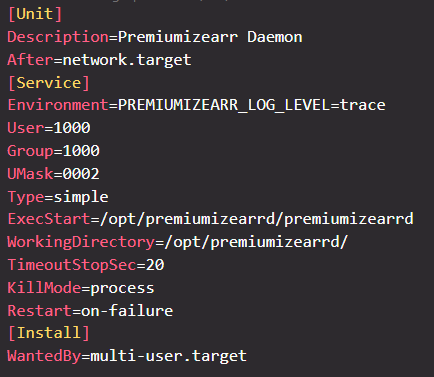
Edit the service file, most commonly found at /etc/systemd/system/premiumizearrd.service but you may have customized this location.
Add the line
Environment=PREMIUMIZEARR_LOG_LEVEL=trace
Below the [Service] header
You should be left with something like this
Docker
The log file will appear in the mounted /data directory.
If you're using a run or create command add the flag -e PREMIUMIZEARR_LOG_LEVEL=trace
If you're using docker-compose add PREMIUMIZEARR_LOG_LEVEL=trace to your environment block
CLI
The log file will appear in the same place as your premiumizarrd executable unless you've chosen another location.
Add --log trace after the command