2
0
Files
node-red-contrib-mi-devices/README.md

52 lines
2.2 KiB
Markdown
Raw Normal View History

2017-07-03 22:41:43 +02:00
# node-red-contrib-xiaomi-devices
This module contains the following nodes to provide easy integration of the Xiaomi devices into node-red.
The following devices are currently supported:
* Temperature/humidity sensor
* Aqara temperature/humidity/pressure sensor
2017-07-03 22:41:43 +02:00
* Magnet switch
* Aqara window/door sensor
2017-07-03 22:41:43 +02:00
* Button switch
* Aqara smart wireless switch
2017-07-03 22:41:43 +02:00
* Motion sensor
* Power plug (zigbee)
* Power plug (wifi)
2017-07-03 22:41:43 +02:00
## Preperation
To receive the gateway json messages on your network you need to enable the developer mode, aka LAN mode in the gateway.
A UDP input node is needed to receive the json messages. An UDP output node to send command's to the gateway.
To control the Wifi-Plug, extensive use is made of the miio library created by [Andreas Holstenson](https://github.com/aholstenson/miio). Make sure to check his page for compatible devices.
2017-07-03 22:41:43 +02:00
## Install
```
cd ~\.node-red
npm install node-red-contrib-xiaomi-devices
```
## Usage
2017-07-05 08:49:36 +02:00
From the Xiaomi configurator screen add your different devices by selecting the type of device and a readable description. The readable discription is used on the different edit screen of the nodes to easily select the device you associate to the node.
2017-07-03 22:41:43 +02:00
Note that the Wifi power plug is not configured through the configurator as it is not connected to the gateway.
2017-07-07 07:53:40 +02:00
The Xiaomi configurator screen with ease of use to configure your different devices.
![Xiaomi configurator in node-red](https://raw.githubusercontent.com/hrietman/node-red-contrib-xiaomi-devices/master/xiaomi-configurator.png)
2017-07-05 08:49:36 +02:00
Tip: use the configurator from the side-panel (hamburger menu, configuration nodes) to manage your devices. Node-red doesn't update underlying edit screens if the configuration panel is opened / closed from the edit node screen. (If you do, you need to first close the edit node screen and reopen it by double-clicking the node you want to edit the properties for.)
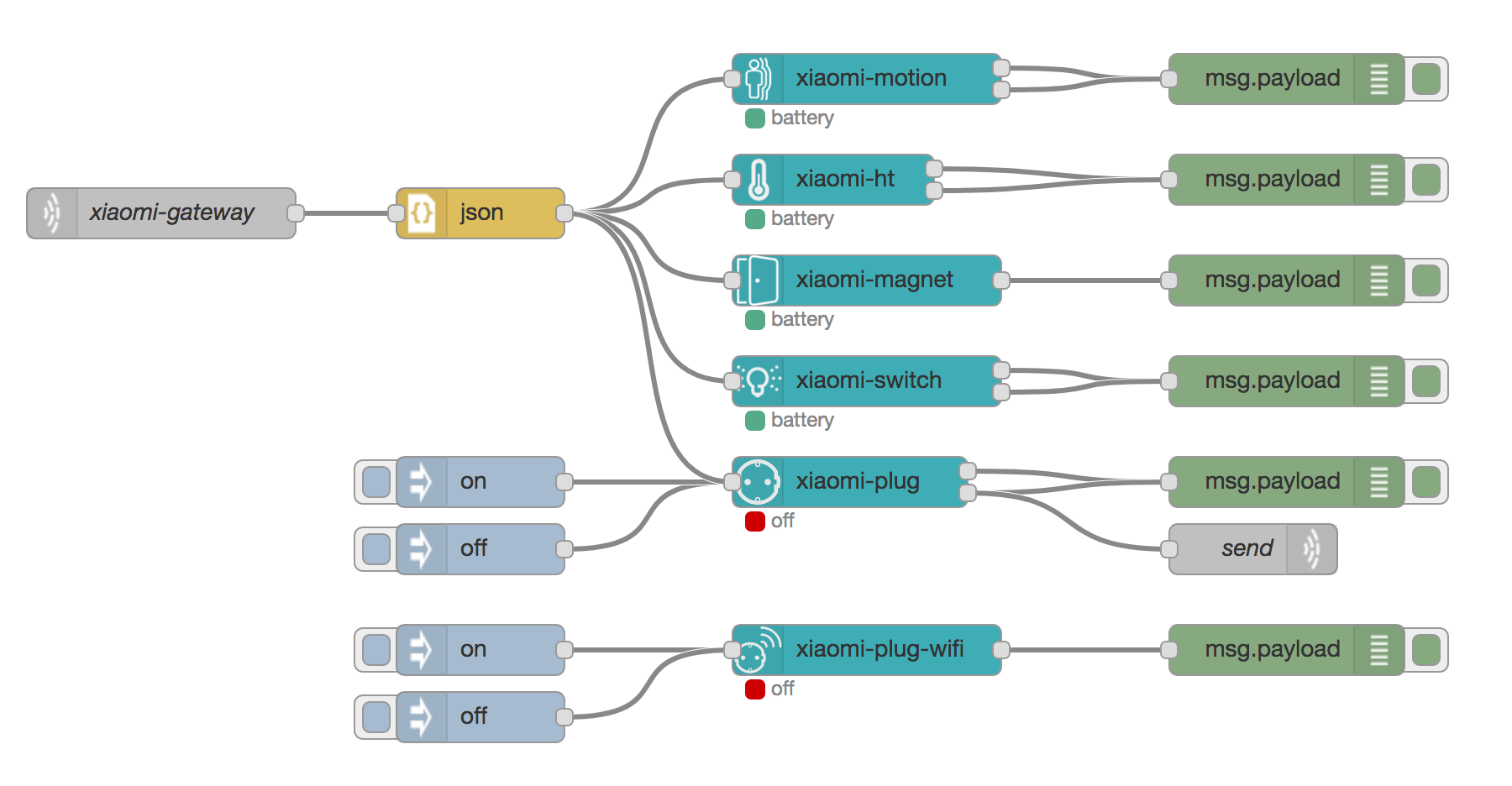
Here an example of how to use the different nodes.
![Xiaomi devices example in node-red](https://raw.githubusercontent.com/hrietman/node-red-contrib-xiaomi-devices/master/xiaomi-devices-overview.png)
2017-07-07 07:53:40 +02:00
## Roadmap
* ~~Support for other devices like the smart-socket WiFi~~ Done!
2017-07-07 07:53:40 +02:00
* Import (new) devices directly from the gateway